Hotel Channel Manager Software: A Complete Guide for Hotels
A hotel channel manager helps hotels manage room rates, availability, inventory, and reservations across multiple OTAs from one centralized system. It reduces manual updates, improves synchronization, and lowers the risk of overbooking.
Table of contents

It's a Friday afternoon and a 40-room property has just taken three bookings inside ten minutes — one from Booking.com, one from MakeMyTrip, one walk-in at the front desk. Four rooms are still showing as available on Agoda that sold an hour ago on the hotel's own website. Somebody has to log into each OTA extranet and pull the inventory down manually before a fourth guest books a room that no longer exists.
This is the daily reality for a lot of independent hotels and small chains, and it's exactly the problem hotel channel manager software was built to solve. Instead of updating five or six OTA dashboards by hand every time a rate or a room count changes, a channel manager sits in the middle and pushes that update everywhere at once — less a convenience than a basic requirement for staying accurate once a hotel sells across multiple online travel agencies.
What Is Hotel Channel Manager Software?
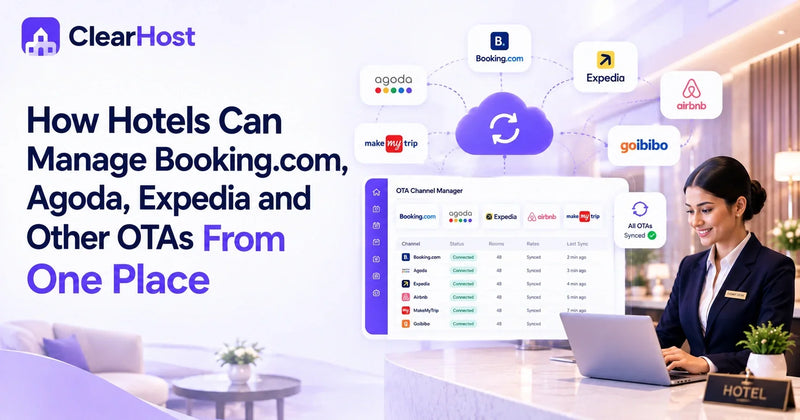
A hotel channel manager is a piece of technology that connects a property's room inventory, rates and availability to the OTAs and booking channels it sells through — think Booking.com, MakeMyTrip, Agoda, Expedia, Airbnb, and the hotel's own direct booking site. Instead of a front-desk or reservations team logging into each platform separately, they make one change in the channel manager, and it distributes that change to every connected channel.
The relationship is simple once it's laid out: Hotel → Channel Manager → OTAs → Guests. The hotel decides what to sell and at what price; the channel manager carries that decision to every connected marketplace, so guests booking anywhere see availability and rates that actually reflect what the hotel has. When a booking comes in from any channel, the same system keeps the hotel's own numbers accurate — nobody at the front desk gets caught off guard by a reservation they didn't know about.
For a non-technical owner, the easiest way to think about it: a channel manager is a translator and a messenger, speaking to every OTA in the format it expects and making sure they're all hearing the same story about the hotel at the same time.
How Does a Hotel Channel Manager Work?
The mechanics are less complicated than they sound, and it typically comes down to four steps. Someone on the team — a revenue manager, a front-desk supervisor, sometimes the owner directly — changes something in the system: closing out a room type for a sold-out weekend, raising a suite's rate because a conference is in town, or applying a stop-sell for rooms held back for maintenance. The channel manager picks up that change from the central system and sends it out to every connected OTA — Booking.com, MakeMyTrip, Agoda, and whichever others the hotel sells through — ideally within moments, since accuracy matters most exactly when bookings are happening fastest. When a guest then books through any of those channels, the reservation flows back into the hotel's central system instead of sitting in a separate OTA inbox someone has to check manually, which is what keeps front desk, housekeeping and revenue teams working from the same picture.
A quick example: a boutique hotel in Goa has 12 sea-view rooms. Eight get booked over a weekend through a mix of Booking.com and the hotel's own site. With a channel manager connected, the remaining four rooms are reflected correctly everywhere else within minutes — nobody has to remember to check MakeMyTrip separately.
Why Do Hotels Need Channel Manager Software?
Hotels that sell on more than one or two channels run into the same handful of problems without this kind of system in place. Manual updates eat time that reservations or front-desk staff could spend on guests, and doing the same update five separate times across five OTA logins is duplicate work — which is where mistakes creep in, like a rate typed correctly on one platform and wrong on another. Delayed updates are the more serious version of the same issue: if it takes hours for a sold-out room to show as sold out everywhere, that gap is exactly when overbookings can happen. A channel manager doesn't make overbooking impossible, but it can reduce the risk when inventory is synchronized correctly and updates go out close to real time. There's also a visibility problem — without a centralized view, it's genuinely hard for a manager to answer "how many rooms do we have left tonight across every channel?" without checking several dashboards first.
Key Features of Hotel Channel Manager Software
Real-time inventory and rate synchronization are the core of it — availability and pricing updates flow to every connected channel as soon as a change is made, without anyone re-entering the same number channel by channel. OTA connectivity is what makes this useful at scale, letting a property connected to six or seven OTAs manage all of those relationships from one dashboard instead of switching between six or seven separate logins. Reservation synchronization brings bookings from every channel back into one place, and availability and stop-sell controls give a hotel direct control over how many rooms are open for sale, or let it close out a room type temporarily — for renovation or a minimum-stay requirement — without going channel by channel. Tying it together, a centralized dashboard means checking one screen instead of several OTA extranets, which adds up across a full year of daily rate and inventory management.
Hotel Channel Manager vs PMS: What's the Difference?
These two terms get used almost interchangeably, but they handle different parts of hotel operations. A property management software for hotels — the PMS — runs the operational side of the property: reservations, guest profiles, front-desk check-in and check-out, housekeeping status, payments and reporting. It's where staff manage the guest's stay from arrival to departure. A channel manager, by contrast, is focused specifically on distribution — getting rates and availability out to OTAs and bringing bookings back in — and doesn't handle housekeeping or guest folios. The two work best connected rather than running as separate tools: when a PMS and channel manager are linked, an update made in one reflects in the other automatically, instead of someone re-entering the same information twice.
How Hotel Booking Management Software and Channel Managers Work Together
Hotel booking management software covers the reservation and guest-data side of things — capturing a booking, storing guest details, tracking payment status, and feeding that to front desk and housekeeping. On its own, it doesn't manage OTA distribution, which is where the channel manager comes in: OTA / Direct Booking → Channel Manager → PMS → Hotel Operations.
A guest books a room on Agoda. The channel manager picks up that reservation and passes it into the property management system, where it becomes visible to the front desk for check-in prep and to housekeeping for room turnover — without anyone re-typing guest details from an OTA confirmation email. A 25-room resort taking bookings from four OTAs plus its own website no longer needs someone checking four separate booking lists each morning and building a master arrivals sheet by hand; with the two systems connected, that sheet builds itself.
Why Mobile Access Matters for Channel Management
None of this operational picture is much use if the person who needs it is standing in a corridor rather than sitting at a desk. A hotel manager checking on a housekeeping issue, an owner reviewing occupancy from a second property across town, a front-desk team slammed with arrivals — none of that waits for someone to get back to a desktop. This is where a pms mobile app becomes the practical extension of channel management rather than a separate concern: if rate and inventory changes only take effect once someone logs into a computer, the real-time advantage of a channel manager gets undercut by how slowly the update actually gets made.
The ClearHost mobile app is built around that gap — putting the operational side of a hotel channel manager software and a hotel booking management software into a phone that works from the lobby, a corridor, or a different property altogether. Reservations from any OTA show up the moment they're confirmed, front-desk staff can verify ID and issue a digital key from the lobby, housekeeping can update room status the instant a room is actually clean, guest messages land in one inbox, and a live occupancy view means an owner off-site sees real numbers rather than a stale export. A stop-sell applied from a phone in the corridor reaches Booking.com and MakeMyTrip the same way one applied from the front-desk computer would — it's the same underlying data, shaped for a phone screen, with role-based access so each person sees only what's relevant to their job:
Mobile PMS → Central Hotel Data → Channel Manager → Connected OTA Channels
Benefits of Using Hotel Channel Manager Software
The practical gains fall into a few buckets: less manual work and faster rate updates, since one change replaces five or six separate logins; better inventory control and lower overbooking risk, because room counts stay accurate across every channel from a single view; centralized OTA management, so nobody switches between extranets to check what's happening; and better coordination, since front desk, housekeeping and revenue management all work from the same numbers.
What Should Hotels Look for in Channel Manager Software?
Start with OTA connectivity and real-time synchronization — check that the platforms your property relies on are supported, and that changes reach them close to real time. PMS and booking management integration matters just as much, since disconnected tools just recreate the double-entry problem in a different form. Beyond that: mobile accessibility, a dashboard staff will actually use, multi-property support and role-based permissions if the hotel might grow, and reliable support for when something needs fixing fast.
Common Mistakes Hotels Make When Choosing a Channel Manager
Choosing on price alone is probably the most common one — the cheapest option often comes with fewer OTA connections or slower sync speeds, and that gap shows up later as lost bookings. Ignoring PMS integration and not checking OTA compatibility cause similar problems in different forms: the software just moves manual work elsewhere, or doesn't cover the channel the hotel relies on most. Skipping a real test of sync speed, overlooking staff permissions, and not considering how the software holds up as the hotel grows tend to surface as frustrations months after purchase rather than before it.
Is a Channel Manager Enough for a Modern Hotel?
A channel manager solves one part of hotel technology — distribution. Most properties are also running a PMS for operations, a booking engine for direct bookings, some form of revenue management for pricing, and increasingly a mobile layer. Treated as separate tools, these can still leave gaps — a rate updated in one system that doesn't reflect in another. An integrated platform, where all of these share the same underlying data, removes a lot of that friction.
How ClearHost Connects Hotel Operations in One Platform
ClearHost brings the property management system, channel manager, booking engine and mobile app together on one platform, so booking, inventory, pricing, payments, guest operations and OTA channels run through the same dashboard. Hotel booking management flows into channel management automatically — a reservation from any OTA updates the same central inventory feeding every other channel. Housekeeping, guest messaging, and check-in and check-out are part of the same system, live occupancy and revenue figures are visible without pulling a report together by hand, and role-based access means each team member sees what's relevant to their job — with multi-property owners getting that same visibility across every site. The mobile side carries all of this into the pocket of whoever needs it, connecting into the same platform as tools like the AI Ads Manager for direct-booking marketing.
Final Checklist for Choosing Hotel Channel Manager Software
-
Does it sync rates and inventory in close to real time, across every connected OTA?
-
Does it bring reservations back into a central system and integrate cleanly with your PMS?
-
Does it support the specific OTA channels your hotel relies on?
-
Can staff access rates, availability and bookings from mobile?
-
Does it support multiple properties and cut down on manual, duplicate data entry?
-
Can it scale as your hotel adds rooms or channels?
If a system answers yes to most of these, it's worth a closer look. One that only handles OTA syncing and connects to nothing else will likely leave the gaps for you to manage.
Frequently Asked Questions
1. What is hotel channel manager software?
Hotel channel manager software connects a property's room inventory, rates and availability to the OTAs it sells through, such as Booking.com, MakeMyTrip and Agoda. Instead of updating each platform separately, staff make one change and the software distributes it to every connected channel. It also brings new reservations back into the hotel's central system, so bookings from any channel are visible in one place rather than scattered across separate OTA logins.
2. How does a hotel channel manager prevent overbooking?
A channel manager doesn't make overbooking impossible, but it can reduce the risk significantly when inventory is synchronized correctly. When a room sells on one channel, the update goes out to every other connected channel close to real time, so the same room isn't shown as available elsewhere. The risk that remains usually comes down to sync speed, how many channels are connected, and whether staff are applying updates promptly and correctly.
3. What is the difference between a PMS and a channel manager?
A PMS, or property management system, handles day-to-day hotel operations — reservations, guest profiles, front-desk check-in and check-out, housekeeping and payments. A channel manager focuses specifically on distribution: syncing rates, availability and inventory across connected OTAs. The two solve different problems, and they work best when integrated, so an update made in one system reflects automatically in the other.
4. Can hotel channel manager software connect with a PMS?
Yes, and for most hotels this integration is the whole point. When a channel manager and PMS are connected, a booking made through any OTA flows directly into the property management system, updating the front desk, housekeeping and reporting without manual re-entry. Platforms like ClearHost combine both into one system, so hotel booking management and channel management share the same data rather than requiring two separate logins and processes.
5. Why is a PMS mobile app useful for hotel managers?
Hotel managers rarely spend the whole day at a desk — they're on the floor, checking on housekeeping, or approving decisions between other tasks. A PMS mobile app puts reservations, rate changes, approvals and live occupancy data on a phone, so decisions don't wait until someone gets back to a computer. It also means updates made from mobile reach the PMS and connected OTA channels the same way updates made from a desktop would.