
Stop pricing by gut. Lift RevPAR every night.
Your best rooms shouldn't sell cheap in peak season or sit empty in the trough. ClearHost reads real demand, recommends the right rate for every date, and pushes it live across every channel — so you grow revenue without discounting your way there.
18%
average RevPAR lift
12%
ADR uplift in peak
9 pts
higher occupancy in the trough
365
priced days, decided daily
We stopped copying last year's rates and started pricing the demand in front of us. Peak weekends earn more, the quiet weeks fill up, and I can finally see what's working from one screen.
What gets in the way
Rates set by gut and last year
Pricing off a spreadsheet and a hunch leaves money on the table in peak season — and empty rooms when demand softens. Every wrong rate is revenue you never see.
No real view of demand
Without live signals on how fast rooms are filling or where the market is heading, you're pricing blind — reacting late instead of moving before the surge.
Rate changes that miss channels
Update one OTA and forget another, and you're selling the same room at two prices. Parity gaps cost you margin and get you penalised by the channels.
Built around how you run
The right price, every single day
ClearHost watches demand, pace and your own booking curve, then recommends a rate for every date — and pushes it live to every channel the moment you approve. No spreadsheets, no guesswork, no parity gaps.
- Demand-based rate recommendations for every date
- One tap to approve — auto-pushed to all channels
- Rate rules and floors that protect your best rooms
- Parity held automatically across every OTA
See exactly what drives revenue
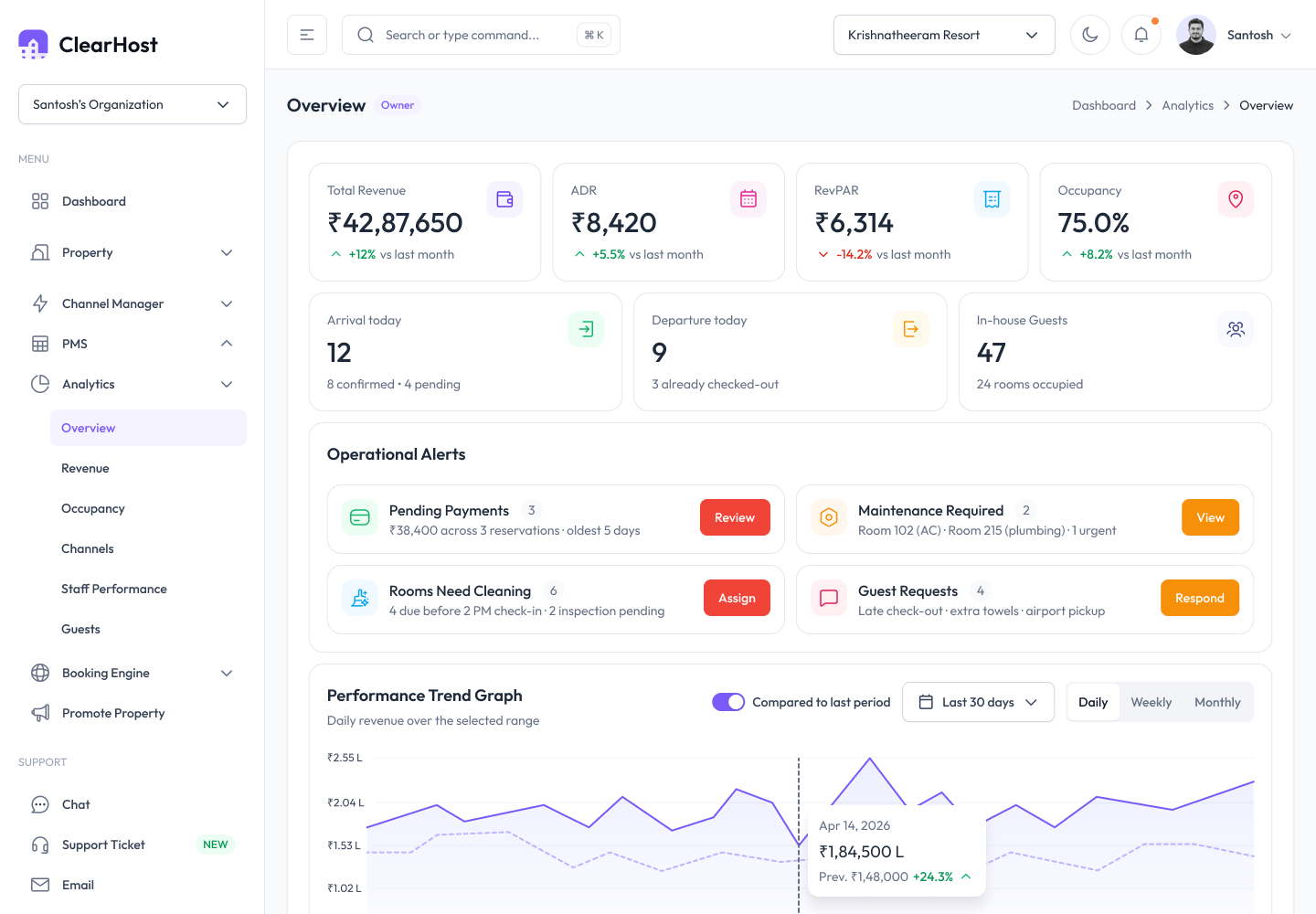
RevPAR, ADR and occupancy in one live view — with the channel mix behind every rupee. Know which dates, segments and channels are pulling their weight, so every pricing decision is backed by the numbers.
- RevPAR, ADR and occupancy tracked live
- Channel mix that shows where revenue really comes from
- Pace and pickup against the same dates last year
- Export-ready reports for owners and reviews
From gut-feel to data-led in days
-
1
Connect your data
We bring in your rooms, rates, booking history and connected channels — the picture ClearHost prices against.
-
2
Set your guardrails
Add your rate floors, ceilings and any rules that protect your positioning. ClearHost recommends inside them.
-
3
Approve and grow
Review the day's recommendations, approve with a tap, and watch RevPAR climb as rates hit every channel in sync.
The modules behind it
Everything you need is built in — turn on what you need, when you need it.
Measure the growth you're aiming for
Free calculators for the metrics that show whether revenue growth is real: room revenue, total revenue and profit.
Good to know
See what smarter pricing could earn you
A quick, personalised walkthrough on your own numbers — or start a 30-day free trial. No credit card, cancel anytime.